Virtual phenotype mapDe-identified sample
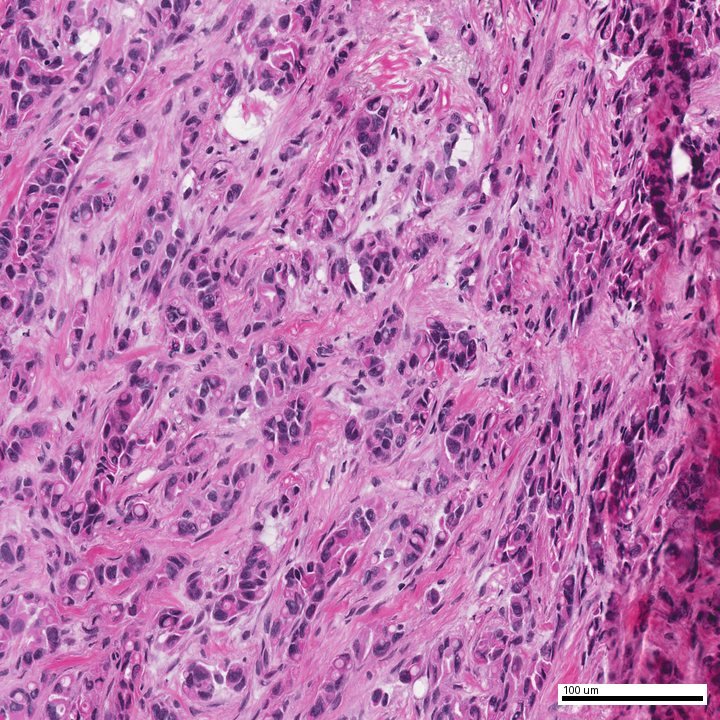
H&E tissue field from the de-identified demonstration report
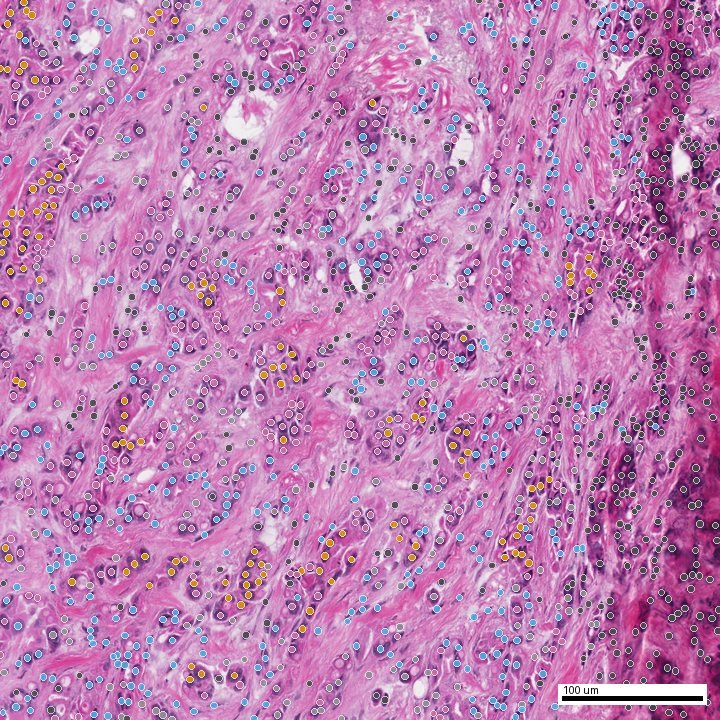
AI-predicted virtual phenotype map on the same tissue field
H&EPredicted phenotype
Drag to compare source morphology with the predicted phenotype map
Tumour29.0%
Endothelial23.3%
Plasma cell10.5%
From digital slide to signed report

Pathology, backed by
evidence you can see.

From eligible initial diagnostic support to a rapid second opinion, TrueDx connects digital pathology cases with qualified pathologists. The result is a signed, evidence-rich report with representative slide images, annotations, measurements, and findings that patients, laboratories, and oncologists can review together.

Start with a digital slide, a glass slide, or a tissue block. We will help identify the appropriate intake and review pathway.

Digital slide intakePhysical slide logisticsSubspecialty matchingVisual evidence report
Start where you are

What do you have in hand?

Some cases arrive as whole-slide images. Others begin with glass slides or a tissue block. Both can reach the same specialist review—with a different first step.

01
Digital-ready cases

Your lab already has whole-slide images

Create a case, add the clinical context, and upload or securely transfer the digital slides into the Path23 workflow.

  1. Create and authorize the case
  2. Transfer WSI files and supporting documents
  3. Match to an eligible subspecialist
  4. Receive the signed evidence report
Digital intake for labs →
02
Physical material

You hold glass slides or a tissue block

Choose a participating scanning location near you or arrange tracked shipping to an authorized TrueDx receiving location.

  1. Register the case without emailing PHI
  2. Select local scanning or tracked shipping
  3. Digitize and quality-check the slides
  4. Route the case through Path23
Physical slide options →
Behind every consultation

The right case reaches the right reviewer.

Path23 keeps the practical work together: image quality, specialist eligibility, slide review, annotations, measurements, and the final signed opinion.

  • Assignment based on subspecialty, credentials, and jurisdiction
  • Case access limited to the people involved in the review
  • Source slides and model-derived evidence available side by side
  • A traceable review history through final sign-out
Path23 case flowIn review
1
Intake completeIdentity, authorization, case context
✓
2
Image QC complete3 whole-slide images accepted
✓
3
Subspecialist reviewMatched by tissue and credentials
•••
4
Evidence reportAnnotations, measurements, sign-out
—
Why the report feels different

Not only text. Visual evidence you and your oncologist can see.

The report connects the written interpretation to representative slide regions, annotations, and measurable features—helping patients understand the opinion and giving oncologists visual findings to review with the care team.

Annotated whole-slide view10× overview
ROI-03
500 μm
01

Annotated findings

Representative regions are linked to the written interpretation.

02

Measurements

Tumor or lesion dimensions and relevant spatial measurements are reported when appropriate.

03

Quantitative morphology

Structured counts, areas, proportions, or other validated case-specific observations.

04

Heatmaps and overview images

Visual summaries help the care team locate and understand the evidence on the slide.

Report components vary by specimen, diagnosis, image quality, and clinical relevance. Quantitative and visual features support—not replace—the reviewing pathologist's professional interpretation. See the complete evidence-rich report →
Who we help

One case touches several people.

TrueDx gives each person a clear next step without losing sight of who owns the clinical decision.

LAB

Laboratories

Bring in subspecialty review without rebuilding every capability inside your own laboratory.

For laboratory teams →
DX

Pathologists

Review cases that fit your expertise with the source slide, evidence, and reporting tools together.

For pathologists →
Start a conversation

Tell us which intake path you need.

Contact TrueDx for service information, laboratory onboarding, scanning options, pathologist-network enquiries, and secure case-intake instructions.

Do not include names, dates of birth, medical-record numbers, diagnoses, reports, or slide files in this public enquiry. We will provide an approved secure intake channel before collecting case information.
General enquiries

A simple, secure starting point

Use our short form without including medical or patient information.

Compose an enquiry

The form does not establish a consultation or physician–patient relationship.